Haven't been able to post for some time due to my trip to Taiwan and China. I had fun experiencing different cultures and I took particular notice with the games and animation there. As expected in Taiwan it was very Japanese anime oriented and even China had some reminiscence of anime in their cartoons, especially with the big eyes.
On the video gaming side, I talked with my cousins and apparently American games dont seem to be performing very well. With the exception of Blizzards World of Warcraft and Starcraft. While its still very Japanese centric, there seems to be a huge surge and transition to online gaming in the Asian market. Especially MMO type games are on the rise.
Another interesting thing I learned there was when I talked with my cousin Chiu Liwei was that to create entertainment media in China you need a Chinese company to claim ownership. This is because the country is trying to promote its own animation and gaming and doesnt want outside companies. To compensate, many chinese companies simply take ownership of outside titles for release inside which I think is extremely stupid.
Monday, March 21, 2011

Wednesday, March 2, 2011
MUGS!!!!

Providence PC game hero ship models

Bomber Type: This ship is larger and slower but has more customizable equipment addons as well as heavier firepower and armor/shielding. It also can be equipped with lances, which are attack drones that detach to focus down nearbye enemy aircraft. It focuses on more kinetic weapons such as missiles, rockets and rail guns.
Fighter Type: This ship I designed it stubbier because my programmer wanted two huge engines. It is much weaker than the bomber type in firepower and has less customizable upgrades. However it is much more manuverable and possesses more special abilities, particularly in using magical weaponry and energy based weapons.
The game will take place in a science fiction universe with some magical fantasy aspects during the invasion of the Systems Ordianance League and their crusade to retake the seperatist territories against the United Aegis Federation. The player will play as a military contractor mercenary faction under the UAF as they assist in repelling the SOL armada to profit off this conflict. However both factions are corrupt each with subgroups and personal agendas. The player will not be a hero, but rather in a more grey point of view, rescuing and liberating rebel planets as well as commiting atrocities and taking advantage of innocents as long as it profits and meets the agenda of your company and the profit lords that watch over the UAF....
With our current development schedule (and my amazing programmer Ian) we will have the game roughly playable by next week (with a lot of placeholders) and gradually insert details in.
During the process of making this and porting it as a obj file to my programmer I learned that the models tend to have multiple objects with different objects as quads or tris. To resolve this issue I learned that I needed to combine all objects and then trianguate the polys in Maya before I export.
Assignment 3 Part 5: Creative Use of Color
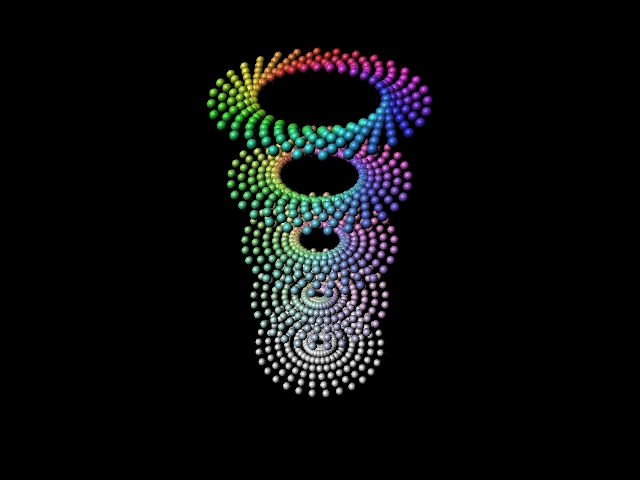
Was playing around with the color wheel code to see if I could do anything interesting with it. I liked how the color cube project had a more 3D aspect to it than the previous wheel assignment so I decided to add a z axis as well. The layers of circles gradually become more saturdated as they go up, also the center space gets bigger too.
float $rotate = 360/30.0;
float $translate = 1.0/5.0;
string $name;
string $name2;
for ($x=0;$x<30.0;$x++)
{
for ($y=0;$y<5;$y++)
{
for($z=0;$z<8;$z++)
//Add a z axis
{
$name = `shadingNode -asShader blinn`;
$name2 = $name + ".color";
$angle = $x * $rotate;
$saturate = $y * $translate;
$hue = $angle/360.0;
//Assign Blinn shaders
vector $color = hsv_to_rgb(<<$hue, $saturate, 1>>);
//Convert HSV to RGB, set max of 1 (if RGB are all 1 it creates white)
setAttr $name2 -type double3 ($color.x) ($color.y) ($color.z);
//Set shaders
sphere -ch on -o on -po 0 -ax 0 1 0 -r 0.0538244 -nsp 4 ;
//Make Nurb Spheres
xform -translation $saturate ($y+1.0) ($z/7.0);
//changed transformation from previous circle code for translation changes
rotate -pivot .1 .1 .1 0 $angle 0;
//translating the balls to form circular shape
hyperShade -assign $name;
//Assign shaders
}
}
}
;
Tuesday, March 1, 2011
Assignment 3 Part 4: Nonlinear Complementary Transitions

float $rotate = 360.0/30.0;
string $name;
string $name2;
for ($x=0;$x<15.0;$x++)
{
for ($y=0;$y<1;$y++)
//set 15 balls around so it only goes half a circle so its complementary(30 is full circle), change to 1 ball since you dont need layers like the original color wheel. Rotation will still be needed for hue changes.
{
$name = `shadingNode -asShader blinn`;
$name2 = $name + ".color";
$angle = $x*$rotate;
$hue = $angle/360.0;
//Assign Blinn shaders, note despite linear transition angle is going to be needed for the hue changes
vector $color = hsv_to_rgb(<<$hue, 1, 1>>);
//Convert HSV to RGB
setAttr $name2 -type double3 ($color.x) ($color.y) ($color.z);
//Set shaders
sphere -ch on -o on -po 0 -ax 0 1 0 -r 0.0538244 -nsp 4 ;
//Make Nurb Spheres
xform -translation (0.25*$x) 0 1;
//Translate balls in a linear fashion and ignore the angle
hyperShade -assign $name;
//Assign shaders
}
}
;

float $rotate = 360.0/30.0;
string $name;
string $name2;
for ($x=5;$x<25.0;$x++)
{
for ($y=0;$y<1;$y++)
{
$name = `shadingNode -asShader blinn`;
$name2 = $name + ".color";
$angle = $x*$rotate;
$hue = $angle/360.0;
vector $color = hsv_to_rgb(<<$hue, 1, 1>>);
setAttr $name2 -type double3 ($color.x) ($color.y) ($color.z);
sphere -ch on -o on -po 0 -ax 0 1 0 -r 0.0538244 -nsp 4 ;
xform -translation (0.25*$x) 0 1;
hyperShade -assign $name;
}
}
;
Assignment 3 Part 3: Complementary Linear Transition

string $name;
string $name2;
float $red2;
float $green2;
float $blue2;
int $x = 0;
for ($x=0;$x<15.0;$x++)
{
$red2 = 1.0;
$green2 = 0.0;
$blue2 = 0.0;
//sets color variables, default is red
$red2 -= ($x*0.06);
$green2 += ($x*0.06);
$blue2 += ($x*0.06);
//set color transition
$name = `shadingNode -asShader blinn`;
$name2 = $name + ".color";
//assigns shaders
setAttr $name2 -type double3 ($red2) ($green2) ($blue2);
//sets shaders
sphere -ch on -o on -po 0 -ax 0 1 0 -r 0.0538244 -nsp 4;
//create nurb spheres
xform -translation (0.25*$x) 0 1;
//spawns the balls in a line
hyperShade -assign $name;
//assigns shaders to balls
}
;
string $name2;
float $red2;
float $green2;
float $blue2;
int $x = 0;
for ($x=0;$x<15.0;$x++)
{
$red2 = 1.0;
$green2 = 0.0;
$blue2 = 0.0;
//sets color variables, default is red
$red2 -= ($x*0.06);
$green2 += ($x*0.06);
$blue2 += ($x*0.06);
//set color transition
$name = `shadingNode -asShader blinn`;
$name2 = $name + ".color";
//assigns shaders
setAttr $name2 -type double3 ($red2) ($green2) ($blue2);
//sets shaders
sphere -ch on -o on -po 0 -ax 0 1 0 -r 0.0538244 -nsp 4;
//create nurb spheres
xform -translation (0.25*$x) 0 1;
//spawns the balls in a line
hyperShade -assign $name;
//assigns shaders to balls
}
;
For different color transitions, I adjust the $red2, $green2. $blue2 by changing the positive and negative

string $name2;
float $red2;
float $green2;
float $blue2;
int $x = 0;
for ($x=0;$x<15.0;$x++)
{
$red2 = 1.0;
$green2 = 0.0;
$blue2 = 0.0;
//sets color variables, default is red
$red2 -= ($x*0.06);
$green2 += ($x*0.06);
$blue2 -= ($x*0.06);
//set color transition
$name = `shadingNode -asShader blinn`;
$name2 = $name + ".color";
//assigns shaders
setAttr $name2 -type double3 ($red2) ($green2) ($blue2);
//sets shaders
sphere -ch on -o on -po 0 -ax 0 1 0 -r 0.0538244 -nsp 4;
//create nurb spheres
xform -translation (0.25*$x) 0 1;
//spawns the balls in a line
hyperShade -assign $name;
//assigns shaders to balls
}
;
Assignment 3 Part 2: Color Wheel

float $rotate =360/30.0;
//float $translate = 1.0;
string $name;
string $name2;
for ($x=0;$x<30.0;$x++)
{
for ($y=0;$y<1;$y++)
//set 30 balls around
{
$name = `shadingNode -asShader blinn`;
$name2 = $name + ".color";
$angle = $x * $rotate;
$hue = $angle/360.0;
//Assign Blinn shaders
vector $color = hsv_to_rgb(<<$hue, 1, 1>>);
//Convert HSV to RGB
setAttr $name2 -type double3 ($color.x) ($color.y) ($color.z);
//Set shaders
sphere -ch on -o on -po 0 -ax 0 1 0 -r 0.0538244 -nsp 4 ;
//Make Nurb Spheres
xform -translation 1 0 0;
rotate -pivot .1 .1 .1 0 $angle 0;
//translating the balls to form circular shape
hyperShade -assign $name;
//Assign shaders
}
}
;

Color Wheel 2: This time I tried to implement a color wheel with saturation values and greys
float $rotate = 360/30.0;
float $translate = 1.0/5.0;
string $name;
string $name2;
for ($x=0;$x<30.0;$x++)
{
for ($y=0;$y<5;$y++)
//set 30 balls around added translate to keep balls closer together
{
$name = `shadingNode -asShader blinn`;
$name2 = $name + ".color";
$angle = $x * $rotate;
$saturate = $y * $translate;
$hue = $angle/360.0;
//Assign Blinn shaders
vector $color = hsv_to_rgb(<<$hue, $saturate, 1>>);
//Convert HSV to RGB, set max of 1 (if RGB are all 1 it creates white)
setAttr $name2 -type double3 ($color.x) ($color.y) ($color.z);
//Set shaders
sphere -ch on -o on -po 0 -ax 0 1 0 -r 0.0538244 -nsp 4 ;
//Make Nurb Spheres
xform -translation $saturate 0 0;
rotate -pivot .1 .1 .1 0 $angle 0;
//translating the balls to form circular shape
hyperShade -assign $name;
//Assign shaders
}
}
;
Subscribe to:
Posts (Atom)